
Business and collaboration
Connect ERP for sales, purchasing, inventory and shipping with groupware for approvals, schedules and communication.
01 · COMPANY / EGI
Smart factory implementation · Busan · Ulsan · Gyeongnam · Gyeongbuk · Daegu · Gyeonggi · Nationwide
From ERP, MES, POP and groupware to equipment integration.
Building on our experience connecting systems for each company,
we are transitioning to FactoryMate-based AI transformation solutions powered by RECODA.
02 · TRACK RECORD
Established in 2017 Our next chapter: AI transformation.
Feedback from working together in the field
Additional projects beyond the 48 officially listed
Smart manufacturing supplier · 2025 reference
Overall grade 3
03 · AI TECHNOLOGY
Connect work and systems around your business flow, rather than treating them as isolated features.
Connect ERP for sales, purchasing, inventory and shipping with groupware for approvals, schedules and communication.
Connect shop-floor results and equipment data through MES, POP, PLCs, controllers and sensors.
Connect office and shop-floor environments and design AI workflows on FactoryMate.
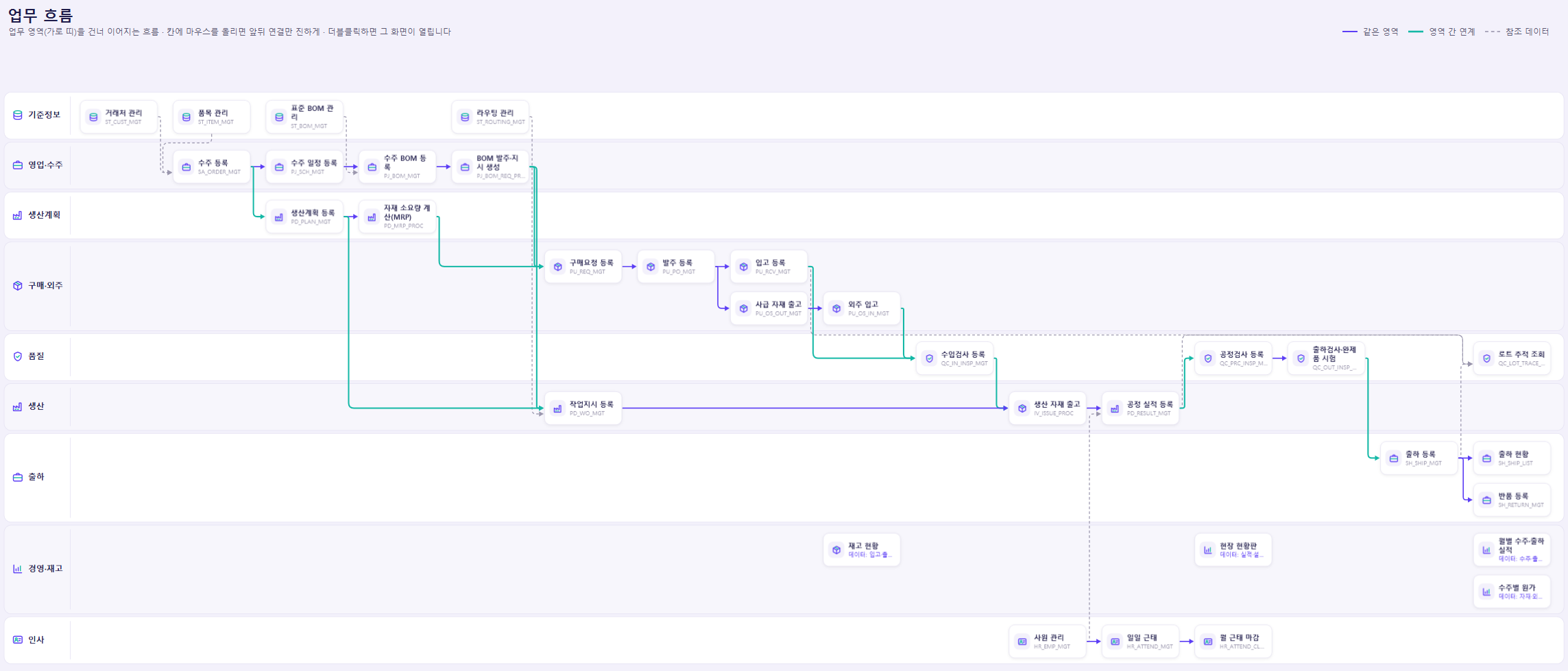
Connecting data is not enough: without understanding meaning and processing flow, AI may answer incorrectly for your operations.
FactoryMate structures your company’s workflows, business rules and data relationships.AI Assist uses ontologies to answer with both data and workflow context.
AI Assist considers the workflows connecting sales orders, production planning, purchasing, work orders, quality and shipping alongside actual data to explain the current situation and guide the next steps.
Question: “What is the September order status?” Both responses show 49 orders and 47% shipped. The difference is in the assessment and guidance that follow.
Highlights overdue deliveries, incomplete BOMs and production that has not started as items to check.
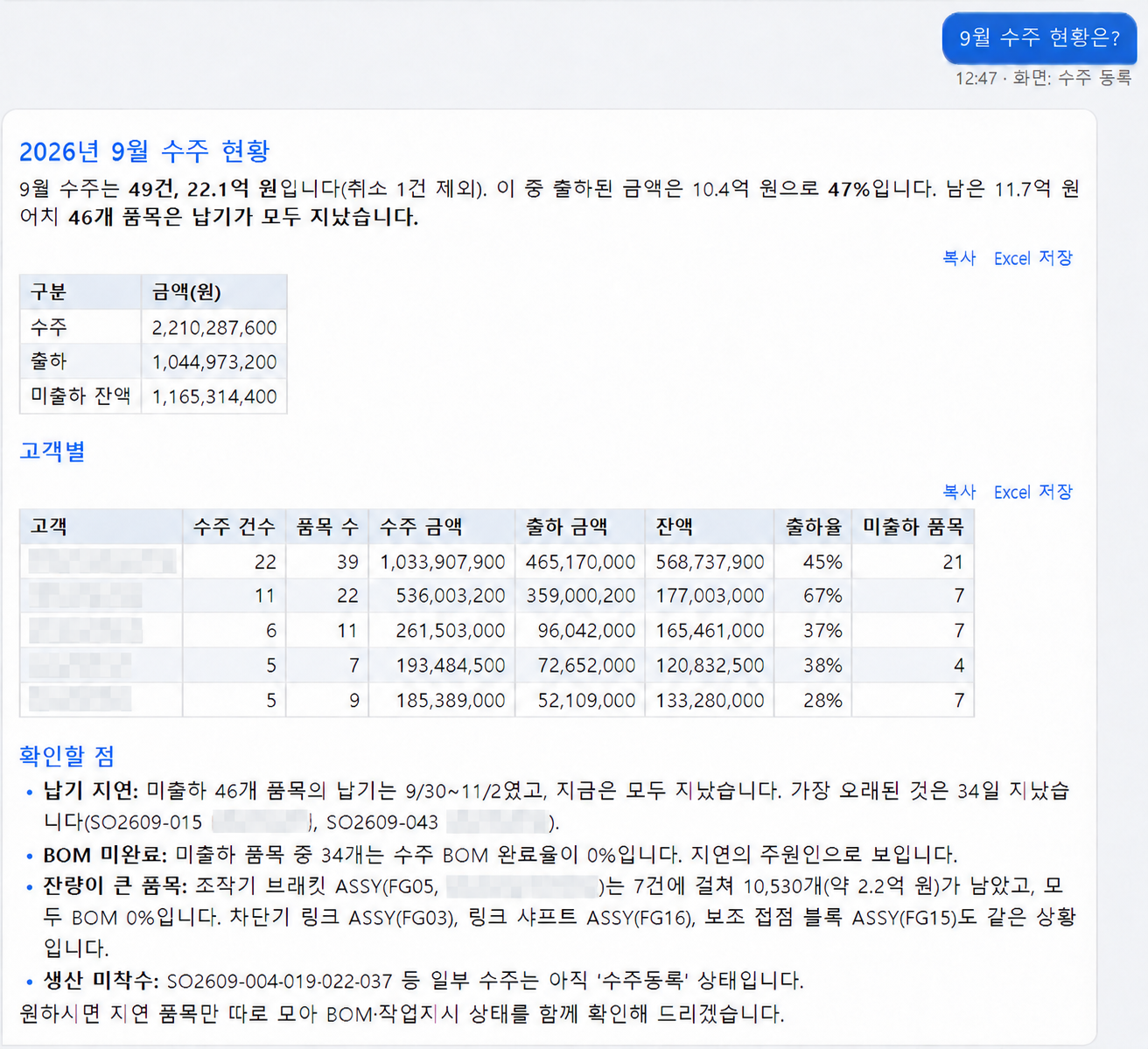 View full screenshot ↗
Distinguishes work awaiting production instructions from unregistered shipments, then guides users through the relevant screens and steps.
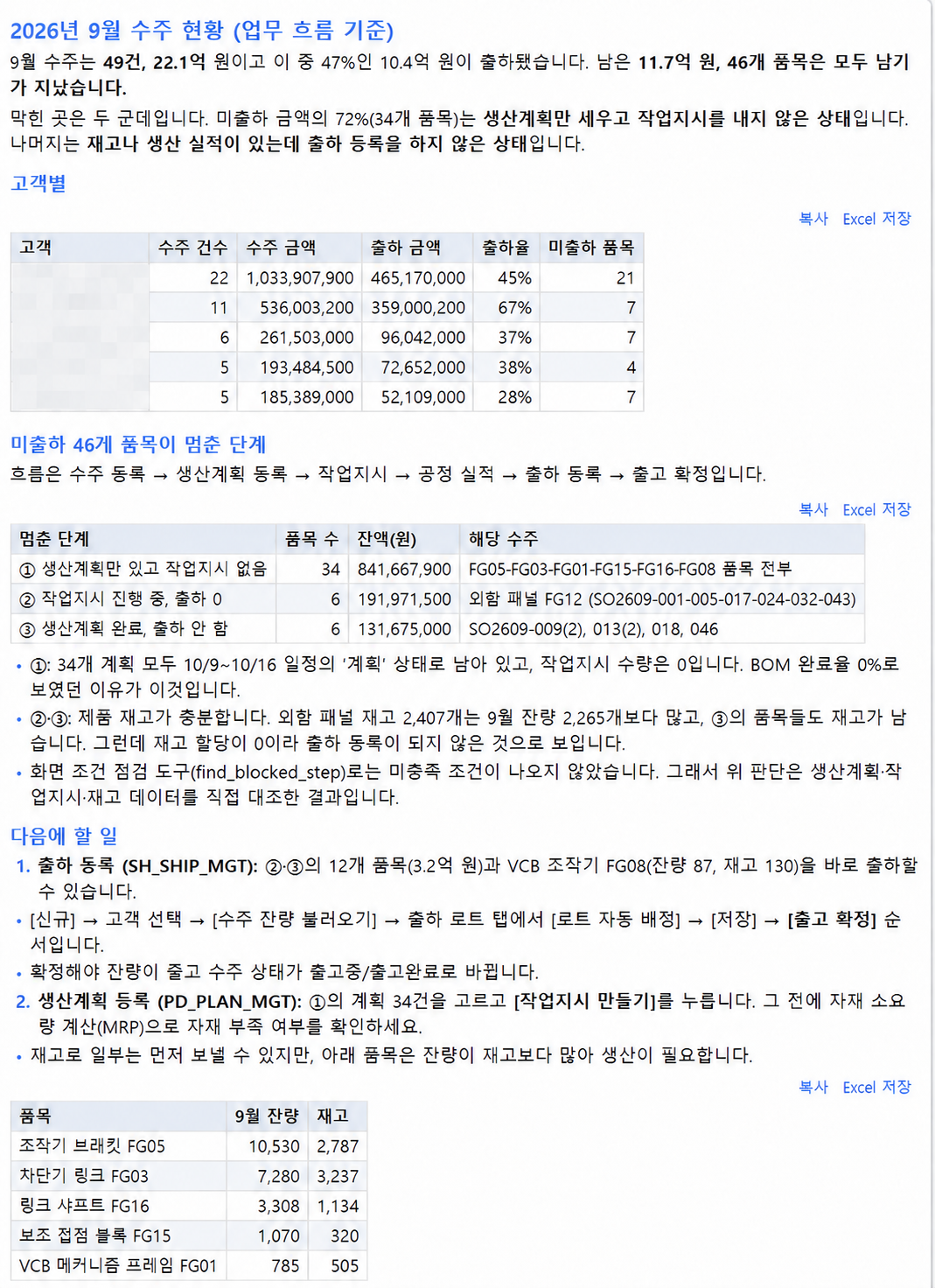 View full screenshot ↗
Beyond the totals, identify where work stopped and what needs to happen next.
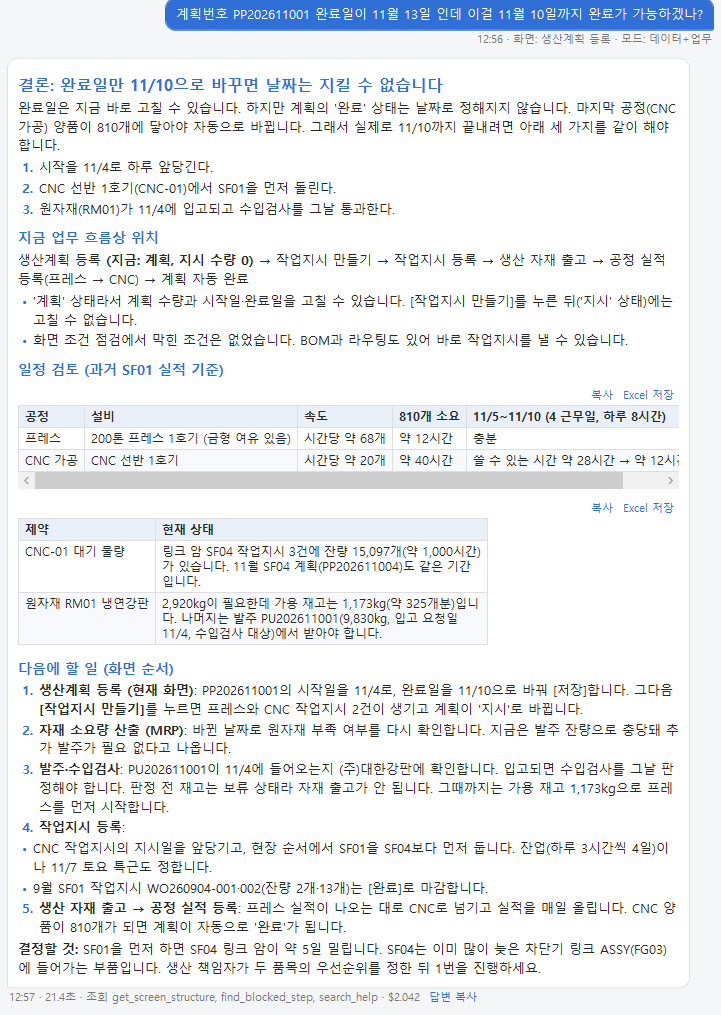
Question: “Can we finish a production plan scheduled for November 13 by November 10?”
Both responses review schedules, equipment and materials. Adding workflow context connects the current status to the changes and actions required.
Reviews processing times, equipment backlogs and raw material inventory to identify what is needed for an earlier completion date.
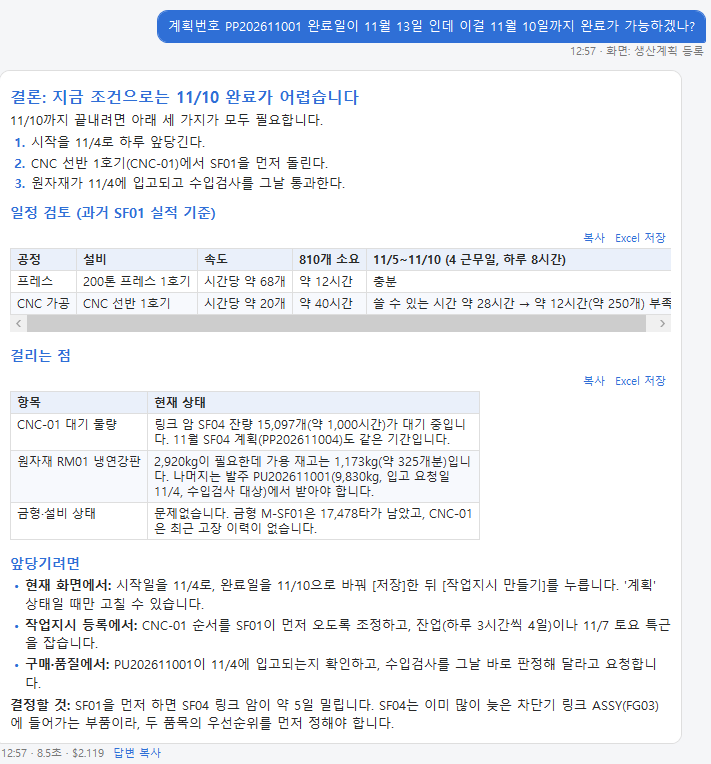 View full screenshot ↗
Explains which changes are possible in the planning stage, when completion is recorded automatically, and the sequence for work orders, material issues and production reporting.
 View full screenshot ↗
Changing a completion date does not complete production. Determine what to change now and in what order.
Even a result must be understood in context: production or shipment, which process, and which entry rules.
Understanding orders, production, inspection and shipping enables AI to interpret the situation and guide the next task.
AI needs current confirmed rules to distinguish errors from exceptions.
If you still have to explain the workflow and correct the answers every time after connecting data, AI implementation is not yet complete.
Connect business processes and data so AI can assist according to your confirmed rules.
Extract part information from drawings and connect it to BOMs, material requirements and work orders.
Create workflows that bring data from drawings, orders and other documents into business systems.
Collect PLC, controller and sensor data for reporting, monitoring and analysis.
Visualize equipment and lines alongside current conditions and summarized information.
Use your company’s own AI account.Your company pays the AI provider directly.
EGI does not resell AI usage or bill you for it.
Use AI for a fixed fee
Pay the fixed fee for your chosen plan.
Check the included features and usage limits.
Pay for what you use
Fees are based on how much AI you use.
Estimate the cost for your expected usage.
Whether you choose a subscription or API access, use your company’s account and pay the AI provider directly.
Compare usage and expected costs to choose the right option for each user.
04 · FACTORYMATE
Build business systems and AI together
and connect them to real operations.
EGI builds company-specific systems on FactoryMate. AI checks data against confirmed rules and assists with queries, analysis, guidance and data entry.
Explore FactoryMate ↗Using the FactoryMate framework, we design and build workflows, screens, features and data structures around your company’s needs.
Transfer the system and business rules, with training for responsible staff.
Review operational changes and reflect them in business practices.
05. OUR CUSTOMERS
Swipe sideways to view the full table
| Industry | Systems | Implementation scope |
|---|---|---|
| Marine equipment | ERP · MES · SCM · PDA |
|
| Steel and rebar processing | ERP · MES · SCM · PDA |
|
| Metalworking | ERP · MES · SCM |
|
| Automotive parts and machinery | ERP · MES · SCM · POP · Monitoring |
|
| Electronic components | ERP · MES · POP · Monitoring · MRP |
|
| Defense industry | ERP · MES · SCM · MRP |
|
| Chemicals and printing | ERP · MES · SCM |
|
| Logistics and warehousing | WMS |
|
Companies and institutions we have supported through implementation and operations.



















06 · NEWS
07 · PROCESS & CONTACT
MOVE TO FACTORYMATE
Using ERP or MES already does not mean you need to start over.
EGI migrates your existing system's workflow structure and datato FactoryMate.
Keep what works, improve what does not, and build the features you need.
Workflow structureMigrate order, production, shipping and settlement flows, screens and business rules.
DataMigrate partners, items, orders, inventory and production results into the new structure.
Start with screen and application lists, table structures and workflow descriptions. You can consult us without design documents or source code.
Use FactoryMate development standards and industry templates to organize existing structures and application lists.
For each screen and table, migrate, improve, add or retire with a proposed direction and its rationale.
Create new applications only from content reviewed and confirmed with your team.
Map old tables to new ones, transfer the data and validate it against confirmed rules. Review mismatches separately.
Universities and research institutions evaluate and validate the structured workflows and business rules.
FactoryMate analyzes the structureAnalyze screen and table structures without sending the original business data.
Start with essential workflowsMigrate by business area, such as sales or production.
Verify through parallel operationsCompare results from the old and new systems before switching over.
Record the reasons for changeDocument what was migrated or changed and why, for future maintenance and handover.
After migration, ask the AI assistant about screens and business rules, and continue improving and extending functions with the same framework.
Tell us about your current system, what to retain and what to change.